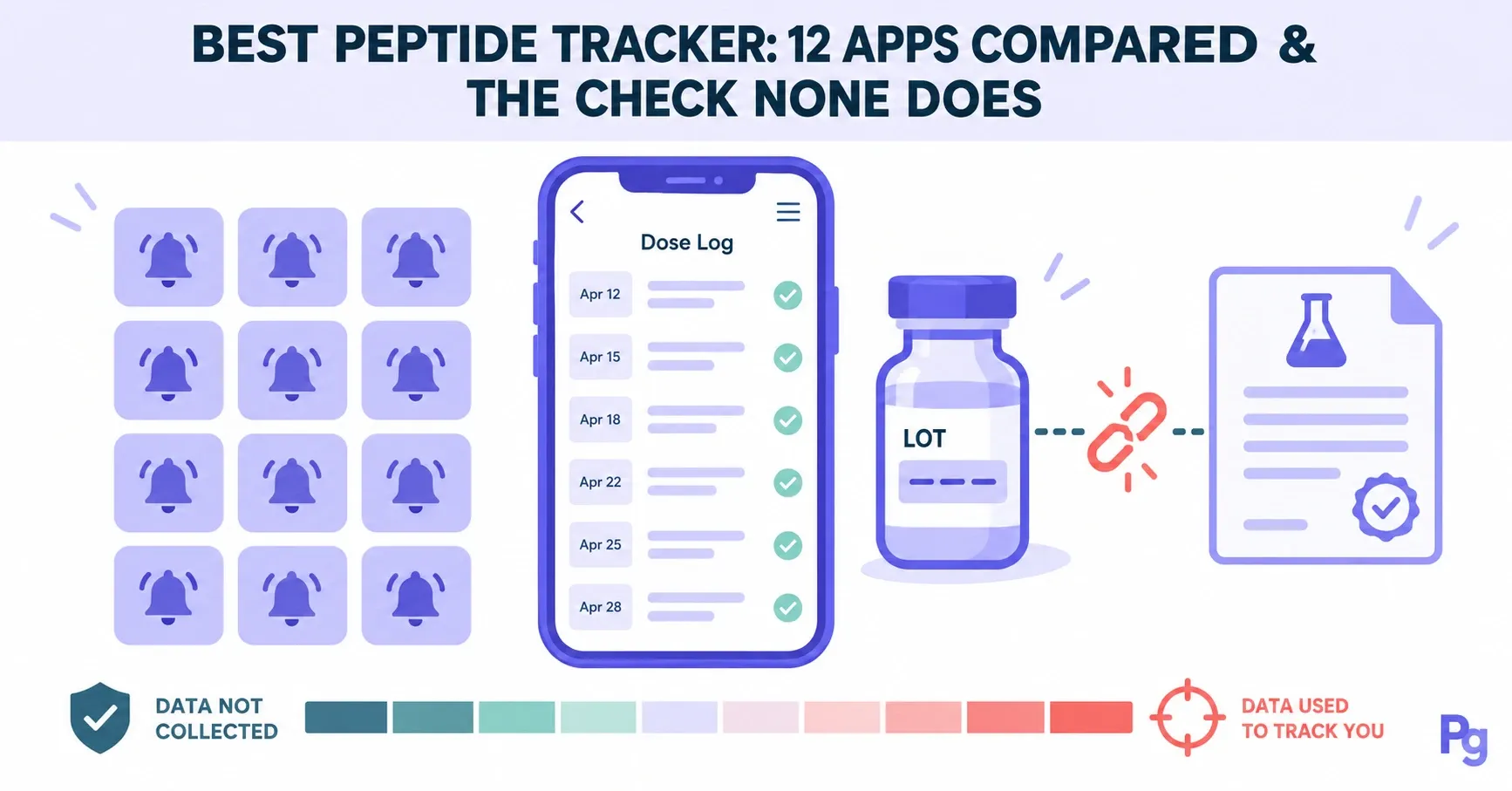
The best peptide tracker ties every logged dose to the vial it came from, because the Peptigrity Purity Index reports that 7.23 % of the 12,710 Peptigrity lab tests that measured how much peptide a vial actually held found less than 95 % of the labeled amount (verified October 2026). We read the App Store and Google Play listings, websites and privacy policies of 12 peptide tracker apps on 15 October 2026: all 12 log doses and send reminders, 11 describe a dose calculator, and none describes checking a vial's lot number against third-party lab certificates.
Each of the five "best peptide tracker" roundups we found that day was published by an app maker, a peptide shop or a site promoting one app, and none of them covered the vial. Peptigrity built one of the trackers compared below, so its entry sticks to what it does and what it does not do. Peptigrity is self-funded, carries no ads or sponsorships and earns no commission on anything it links to, so no app on this page paid to be here.
The short version
A peptide tracker is an app or web page that logs each dose, converts the milligrams in a vial into syringe units and keeps a dated history.
Of 12 tracker apps compared on 15 October 2026, two track for free with nothing behind a paywall, and two charge a subscription for their tracking features.
Their Apple privacy labels range from "Data Not Collected" to "Data Used to Track You", and health-privacy laws such as HIPAA may not cover what you type into them.
None of the 12 checks your vial's lot number against lab certificates, although 7.23 % of the tests on Peptigrity that measured net content found less than 95 % of the labeled amount (verified October 2026).
Peptigrity's free tracker, which we built, logs your protocol week by week and checks the vial's lot against the certificates on file; it sends no reminders and suggests no doses.
What should the best peptide tracker do?
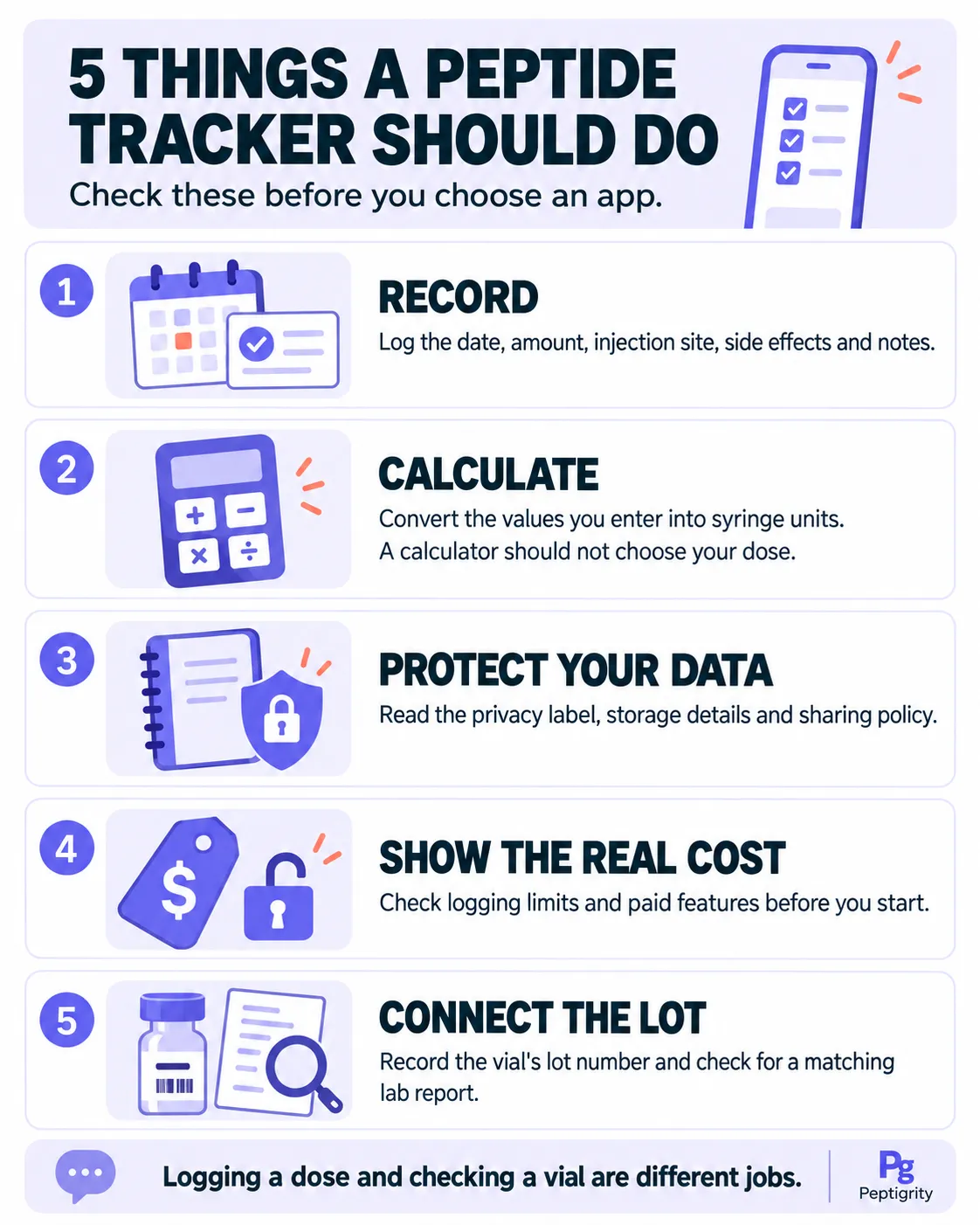
The best peptide tracker does five jobs: it records each dose with its date, injection site and side effects; converts the vial's milligrams and the water you add into units on your syringe; keeps that record private; shows what tracking costs before you start; and ties the log to the lot number printed on the vial. All 12 apps compared here log doses, 11 describe a dose calculator, and none checks the lot (listings read 15 October 2026).
The record is the job every app does. A useful entry holds the date, the amount you actually drew rather than the amount you planned, the injection site, your weight and waist, side effects and a short note. Peptigrity's printable sheet uses those columns plus the lot number, the smallest set that still reads clearly months later. The arithmetic job starts with reconstitution, the step where water is added to the freeze-dried powder in the vial, and ends with the number of units to draw. Each of the five jobs has a place to check before you download anything:
Job | What a good tracker does | Where to look before you download | Warning sign |
|---|---|---|---|
Record | Logs each dose with its date, site and side effects | The feature list and screenshots on the store page | Logging capped behind a paywall that appears only after setup |
Arithmetic | Converts vial milligrams and water into units on your own syringe | The calculator description: syringe sizes, U-100 units | A dose filled in for you |
Privacy | Keeps the log yours | The App Privacy section and the privacy policy's sections on partners and offers | "Data Used to Track You" on the label |
Cost | Shows the price of tracking up front | The In-App Purchases list on the store page | "Free" that only means free to download |
The vial | Ties the log to the lot number and checks it | Any mention of lot, batch or certificate | No place to record the lot at all |
The first four jobs are features an app can build. The fifth needs something none of the 12 apps describes: a lookup of your lot number against certificates from independent laboratories.
How do 12 peptide tracker apps compare?
The 12 peptide tracker apps compared here differ far more on cost and data than on features: all 12 send dose reminders, 11 describe a dose calculator and 10 chart estimated blood levels, yet two charge a subscription for tracking and three declare on Apple's privacy label that your data may be used to track you (listings read 15 October 2026). Pick by the job that matters most to you, then check the vial separately.
The 12 are the tracker apps that appeared on Google's first US page for "peptide tracker", "peptide tracker app" and "best peptide tracker" on 15 October 2026, plus the apps compared in the roundups ranking there. Three with fewer than 25 App Store ratings each (PeptideFox, Dosefi and Peptide Library and Tracker) are left out of the table. We read each app's US App Store listing, its Google Play listing where one exists, and the maker's website and privacy policy that day. We did not install the apps, so every feature below is as its maker describes it.
Tracker (App Store rating) | Runs on | What tracking costs (US) | Where your log lives | Apple privacy label | Lot number |
|---|---|---|---|---|---|
PeptidePal (4.7 · 4.7K ratings) | iPhone, Android | Subscription for tracking: $9.99–$14.99 a month, $39.99 a quarter or $19.99–$59.99 a year | On the phone by default; optional iCloud sync | Data Used to Track You | Not mentioned |
Pep AI (4.7 · 3.9K) | iPhone, Android | Subscription for tracking: $9.99 a month or $29.99–$49.99 a year | Synced to your account | Data Used to Track You | Not mentioned |
Peptide Tracker, peptidetracker.ai (4.9 · 2.6K) | iPhone, Android, web | Free; an optional $20–$80 yearly membership adds support perks | US servers; anonymous or email account | Data Linked to You, incl. health | Lot numbers for supplies |
PeptIQ (4.7 · 944) | iPhone, Android, web | Basic features free; full access needs Premium: $19.99–$24.99 a month or up to $129.99 a year ($109.99 on the web) | On the phone, or cloud sync with an account | Data Used to Track You | Lot field; scans a certificate you supply |
Peptide Tracker & Calculator (4.8 · 564) | iPhone | Free to start; Full App Access $3.99–$4.99 a month or $19.99–$24.99 a year | On the phone, no account; optional iCloud | Data Not Collected | Batch-number field |
Regimen (4.8 · 513) | iPhone, Android | Free for one compound; Premium $7.99 a month or $49.99 a year | Cloud account (email) | Data Linked to You, incl. health | Not mentioned |
PepTracker (4.7 · 467) | iPhone | Free with a protocol limit; $4.99 a month or $47.99 a year | Account sign-in; cloud backup on Premium | Data Linked to You | Not mentioned |
Injectly (4.9 · 458) | iPhone | Free; no in-app purchases | On the phone without an account; free account to sync | Data Linked to You, incl. health | Not mentioned |
PeptideKit (4.7 · 304) | iPhone | Free download; Plus from $3.99 a week, $9.99 a month, $39.99–$49.99 a year or $69.99 once | On the phone, no account | Data Not Linked to You | Not mentioned |
OptiPin (4.8 · 174) | iPhone | Free for one medication; $4.99 a month or $19.99–$39.99 a year | On the phone, no account; optional encrypted iCloud backup | Data Not Linked to You | Not mentioned |
Smart Peptide Tracker (4.7 · 162) | iPhone, Android, web | Core tracking free (with ads); one-time Premium tiers $18.99–$54.99 | Account required, per its Google Play listing | Data Linked to You, incl. health | Not mentioned |
Dose: Peptide Tracker (4.7 · 99) | iPhone | Free with limited logs; Pro $4.99 a month or $14.99–$24.99 a year | No account; backup to Files or iCloud Drive | Data Linked to You, incl. health | Optional lot field |
Peptigrity's tracker (ours; a web page, no store rating) | Any browser | Free; no paid tier, no ads, no commissions | Your Peptigrity log, private by default; CSV export | No app, so no label | Checked against the certificates on file |
Each row is as listed on the app's US App Store page, its Google Play page where one exists, and its maker's website and privacy policy, all read on 15 October 2026. Ratings are App Store figures for that day; prices are the plans in each app's US in-app purchase list or on its maker's pricing page. "iPhone" stands for Apple's App Store, where most of these apps also list iPad and Mac versions.
Read the table by the job you care about most:
Peptide Tracker & Calculator declares that it collects no data, and OptiPin and PeptideKit run without an account and declare only data not linked to you.
Peptide Tracker and Injectly put no tracking feature behind a payment.
Regimen, OptiPin, PeptideKit, Dose, Peptide Tracker & Calculator and PeptIQ list estimated level charts, bloodwork and side effects in one app, though OptiPin and PeptIQ keep some of it for paying users.
PeptidePal, PeptIQ, Peptide Tracker and Pep AI build a community into the app.
None of the 12 checks whether your vial's lot has been tested, and Peptigrity's tracker does.
A rating count says how many people rated an app, not whether it does any of the five jobs well.
Why can't a peptide tracker app tell you what's in the vial?
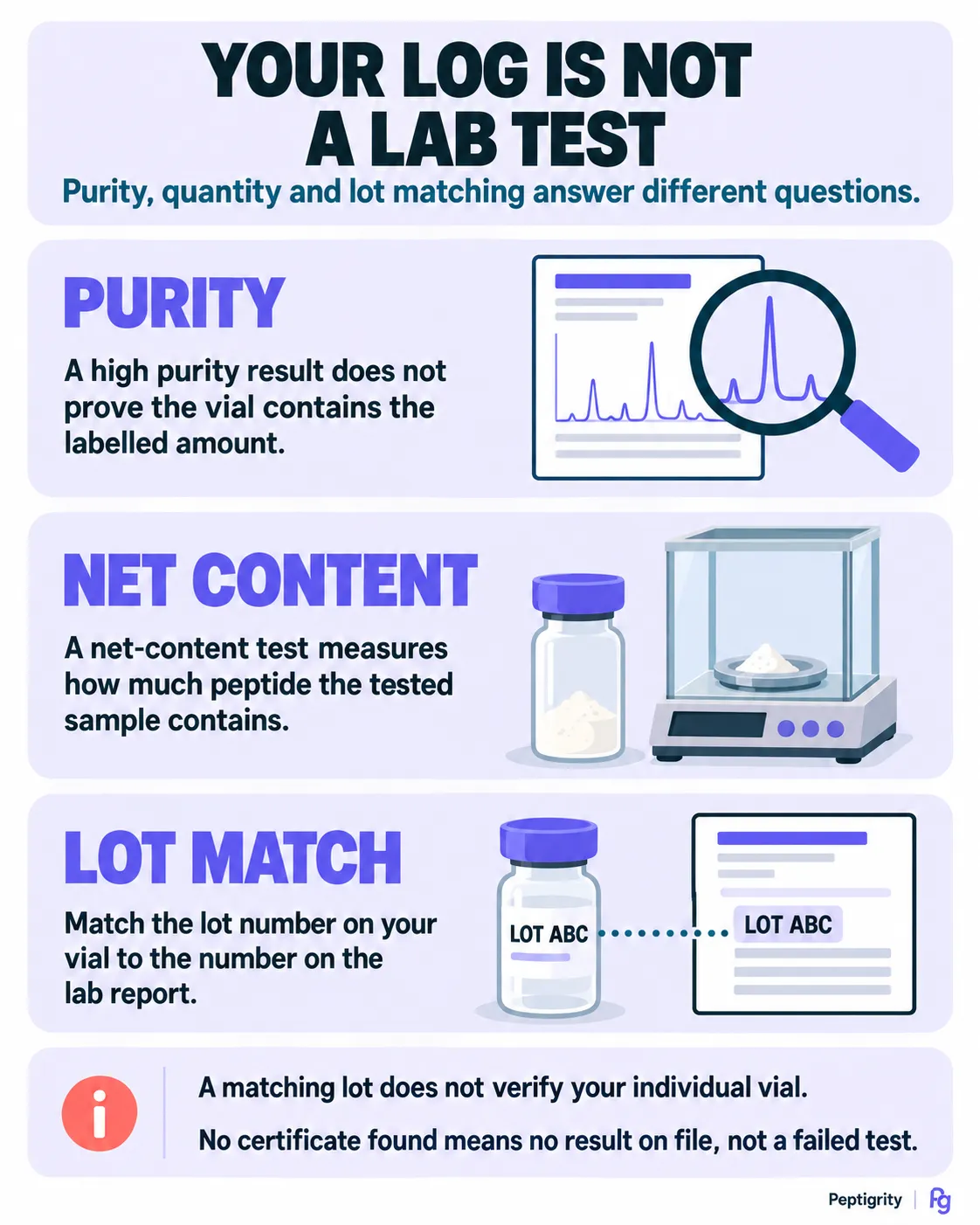
A peptide tracker app multiplies whatever the vial's label says, so a short-filled vial makes every entry wrong by the same margin: on Peptigrity, 919 of the 12,710 lab tests that measured net content (7.23 %) found less than 95 % of the labeled amount, against 0.28 % of 13,364 purity results below 95 % purity (verified October 2026). The lot number printed on the vial is the only link between a log and a lab result.
Net content is the weight of peptide actually in the vial, as opposed to the figure printed on its label, and Peptide Net Content explains why the two differ. Every tracker calculates from the milligrams you enter, and those come from the label. A vial that holds 80 % of its label therefore delivers 80 % of every amount the log records, however carefully each entry is made. Purity does not catch this: a vial can test 99 % pure and still hold too little peptide.
Four of the 12 apps give you a place to type a lot or batch number: Peptide Tracker & Calculator, Dose, PeptIQ and Peptide Tracker (for supplies). None of their listings or websites describes looking that number up anywhere. PeptIQ comes closest: its release notes describe scanning a certificate of analysis (COA, the lab report a shop publishes for a batch) for lab-trust signals, and its website publishes the certificates it has audited, sorted by compound and vendor. None of the PeptIQ pages we read describes searching them by your lot number.
A lot lookup works the other way round. Peptigrity publishes 13,413 third-party lab certificates on Peptide Lab Tests (verified October 2026), nearly all of them published by the shops that sold the vials. Of those, 11,058 carry a lot number that the Peptide COA lookup can search (verified October 2026); the lookup names the lab, the purity it found and the shop the vial came from, or says plainly that no certificate is on file. A matching certificate describes the lot rather than your own vial, and the shop chose to publish it. Write the lot number down on the day the vial arrives, because a lot nobody recorded cannot be checked later.
Which peptide tracker apps are actually free?
Two of the 12 peptide tracker apps put no tracking feature behind a payment: Peptide Tracker (iPhone, Android and web; an optional yearly membership adds support perks) and Injectly (iPhone; no in-app purchases), according to their listings on 15 October 2026. Six cap the free version, two leave the free limits unstated, and PeptidePal and Pep AI charge a subscription for their tracking features. In a store listing, "free" usually means free to download.
The other eight sit between those two ends:
OptiPin, Regimen, PepTracker, Dose, Smart Peptide Tracker and PeptIQ cap the free version at one medication, one compound, a set number of protocols, a limited number of logs, core tracking and basic features respectively.
Smart Peptide Tracker sells its analytics, dosing references and AI allowance as a one-time Premium purchase, and its free version shows ads.
Peptide Tracker & Calculator and PeptideKit sell subscriptions without their listings saying what the free version keeps.
The two subscription apps say so in their own words. The App Store listing for Pep AI: GLP-1 Peptide Tracker states that its tracking features need a paid subscription, and PeptidePal's listing says the same of protocol tracking. PeptIQ sits on the line between the groups: its pricing page, One plan for whatever you're working toward, says full app access requires Premium, at $129.99 a year through the App Store or $109.99 a year on the web, while its homepage lists reminders, basic analytics and calculators as free.
Peptide Tracker's membership is optional, and its terms describe it as an annual auto-renewing subscription whose perks are priority support and early access to new features; the app's features stay free either way. Open the In-App Purchases list on the store page before installing any tracker, because that list is where a "free" app shows its real price.
What do peptide tracker apps collect about you?
Peptide tracker apps declare anything from "Data Not Collected" to "Data Used to Track You" on their Apple privacy labels: of the 12, one declares no data collected, two only data not linked to you, six data linked to your identity, and three data that may be used to track you across other companies' apps (labels read 15 October 2026). The labels are the makers' own answers, and the App Store notes that Apple has not verified them.
A privacy label is a summary the developer fills in for Apple, and Apple's guidance, App privacy details on the App Store, makes the developer responsible for keeping it accurate. Tracking, on that label, means linking data from the app with other companies' data for targeted advertising or ad measurement, or sharing it with a data broker. The listing for PeptidePal – Peptide Tracker declares purchases, contact information, identifiers and usage data as data that may be used to track you; Pep AI and PeptIQ declare identifiers.
Health-privacy law protects less here than many readers expect. The FTC's consumer alert Does your health app protect your sensitive info? warns that health apps may not be covered by HIPAA, the US law that binds doctors and health insurers, and that some may use the information they collect to target ads. For most tracker apps, the privacy policy is the document that says what happens to your data.
The privacy policy also says things a label cannot. Peptide Tracker's Privacy policy, updated 12 October 2026, says that people who opt in to its marketing emails or texts may receive offers from health-product partners, including peptide suppliers. Outside the UK and Europe those offers are chosen using the peptides, protocols and supply levels tracked in the app, and the company may earn a commission on a purchase. The same policy says opting in is optional and that tracked data is not passed to those partners.
Six apps can be used without signing up and keep the log on the phone: Peptide Tracker & Calculator, PeptideKit, OptiPin, Dose, Injectly (until you sign in to sync) and PeptIQ (for its basic features). The documents on a single store page do not always agree, though. PeptidePal's App Store description says its analytics are anonymous, with no advertising identifier and no cross-app tracking, while the privacy label on the same page lists data that may be used to track you (15 October 2026).
Peptigrity's calculator keeps the last vial you worked out only in your own browser and sends nothing to a server. The tracker keeps each log private by default, publishing one is a separate choice, and the log's owner can export it as a CSV file. For any app, two checks take a minute before you install it: read the App Privacy section of the store page, then search the privacy policy for "partners", "offers" and "advertising".
Do peptide tracker apps give dose advice or point you to vendors?
Most peptide tracker makers state that their app does not recommend doses, yet at least four of the 12 publish dose figures somewhere: OptiPin, Regimen, Pep AI and PeptIQ, as read on 15 October 2026. On vendors, one of the 12, Peptide Tracker, may email offers from peptide suppliers to users who opt in and earn a commission on purchases, and two smaller trackers list or grade vendors. A dose figure inside a tracker carries no evidence label; an approved label or a published trial does.
OptiPin's website publishes a table of typical reported doses for 217 compounds, and the OptiPin FAQ explains why the figures are not in the app: Apple asked it to remove a built-in reference of common doses and typical cycles from the medication cards, because in-app dosing guidance counts as medical advice unless every value is cited. Regimen's blog guide to BPC-157 lists four dose tiers, Pep AI's web calculators offer preset dose buttons that its compound pages describe as commonly used numbers rather than recommendations, and PeptIQ's library profiles include dosing ranges.
A dose figure has three honest sources, and Sorting Peptides by Dosing Evidence lays them out: the label of an approved drug, the dose a published human trial gave, or the plain statement that no human dose has been established. A number pre-filled by an app, an AI chat or a website table is none of those unless it names which one it is.
Two smaller trackers from the same Google results pages go further into vendors. Peptide Library and Tracker, published by Superfime, compares vendor prices per milligram, lists vendors with ratings and coupon codes, and says the coupons and referral links it carries do not change its vendor order. PeptideFox's website scores named vendors against seven criteria and says it may enter paid referral partnerships with vendors that pass all of them, after further checks. Neither is in the table, because each had fewer than 25 App Store ratings on 15 October 2026.
Peptigrity's calculator never suggests or changes a dose; it picks only the amount of water. Neither the calculator nor the tracker carries a discount code or a link that earns Peptigrity a commission.
How does Peptigrity's free peptide tracker check the vial?
Peptigrity's free peptide tracker logs a protocol week by week and checks the lot number printed on your vial against the certificates on file, 11,058 of which are searchable by lot (verified October 2026). When a certificate matches, its purity result sits next to your doses; when none matches, the log says so. It costs nothing, carries no ads, earns no commission and keeps each log private unless you publish it.
What does the calculator do before you log a dose?
Before a dose reaches the log, Peptigrity's Peptide calculator picks the amount of water so that the dose lands on a printed line of your syringe, and it never suggests or changes the dose itself. You choose the syringe you own, a 0.3, 0.5 or 1 mL U-100 insulin syringe, on which 100 units make 1 mL. The answer is then drawn on that syringe, with a close-up of where the edge of the black stopper should sit.
A draw that falls between two printed lines, or under 5 units, is flagged as hard to measure, and the calculator offers another amount of water or another syringe size that puts the same dose on a line. It also warns that U-40 syringes sold for pet insulin look the same but measure 2.5 times more liquid per mark.
A step-by-step guide uses your own numbers to walk through mixing the vial and drawing a dose, and it stops at a filled syringe. A printable vial label shows the strength, the units to draw, the mixing date and a use-by date 28 days later. The calculator remembers your last vial in your own browser, so it can show which of those 28 days you are on. Every calculator page is free to use, with no sign-up and no subscription.
What does the tracker record, and how does the lot check work?
The tracker records your protocol week by week (the dose, how often you take it, weight, waist, side effects and notes) and ties the log to the vial by its lot number. Every compound calculator carries a box that opens the free peptide tracker with that compound filled in, so the log starts from the compound you just worked out.
Enter the lot number printed on the vial, and the tracker checks it against the certificates on file. When one matches, its purity result sits next to your doses, so the record shows what a lab found in that lot as well as what the label claimed. When nothing matches, the log says so, and a lab test is the way to settle it.
[Visual: a tracker entry with a matched certificate, showing the lab's purity result next to the week's dose]
Logs are private by default. Publishing one is a separate choice, after which other members can answer questions on it while the log is still running. The owner can export the log as a CSV file.
What doesn't the tracker do?
Peptigrity's tracker sends no dose reminders, runs in a browser rather than as an app, and gives no dose: the number in the log is always yours. Keep an app for reminders if they matter to you and run the lot check here; the two do not conflict. Public logs are still few, because the tracker is new.
When is a paper log, or no tracker at all, the better choice?
A paper log or spreadsheet is enough when you can do the syringe arithmetic yourself and write the lot number down, and no tracker is the right first step while you do not know what the vial holds. Peptigrity's printable log sheet fits 12 weeks on one A4 or Letter page, with a lot field and a reconstitution header; a lot lookup or a lab test answers the vial question before any log can.
Is a spreadsheet or paper log enough?
A spreadsheet or paper log is enough if it records the date, the amount drawn, the injection site, your weight and waist, side effects and a note for every entry, plus the vial's lot number. Peptigrity's Peptide log sheet prints those columns with a lot field and a header for the vial size, the water added, the concentration and the units per dose, and nothing on it leaves your printer.
Bound paper journals sold as peptide trackers do the same job. One free spreadsheet template we found is published by a peptide shop and asks for an email address before the download, which gives the shop a way to market to you.
Paper cannot do the arithmetic, and a wrong concentration copied down the page repeats its error in every row. The arithmetic itself is set out in How to Work Out a Peptide Dose, from the vial size and the water added to the marks on the syringe.
When is a tracker the wrong tool?
A tracker is the wrong first step when the vial itself is the open question. Look the lot up before you start a log; if no certificate is on file, a lab test answers what a log cannot, and the guide on how to test your peptides covers choosing a lab and sending a sample.
A tracker is also a record, not a monitor. It stores a side effect with its date, but it cannot tell you whether that side effect is a stop sign, and some side effects are.
Stop and seek care: swelling of the face or throat, difficulty breathing or hives after an injection are signs of a serious allergic reaction; spreading redness, warmth or pus at an injection site with fever is an infection; severe or persistent abdominal pain with vomiting on a GLP-1 drug can be pancreatitis; confusion, sweating or shaking on an IGF-1 or insulin-adjacent compound can be hypoglycaemia. Call your local emergency number (911 in the US, 112 in the EU, 999 in the UK, 000 in Australia) or go to an emergency department, and bring the vial and its label. Research-use vials are not approved products in any jurisdiction, even where a prescription product of the same molecule exists; no article on this site replaces a clinician who knows your history.
Frequently Asked Questions
Is there a free peptide tracker app?
Yes: Peptide Tracker (iPhone, Android and web) and Injectly (iPhone) put no tracking feature behind a payment, according to their listings on 15 October 2026. OptiPin, Regimen, PepTracker, Dose, Smart Peptide Tracker and PeptIQ have free versions with limits, such as one medication or one compound. Peptigrity's tracker is free in any browser and has no paid tier.
What is the best peptide tracker app for iPhone?
The best iPhone peptide tracker depends on the job you care about most: of the 12 compared, PeptidePal has the most App Store ratings (4.7K), Peptide Tracker & Calculator declares that it collects no data, and Injectly is free with no in-app purchases (15 October 2026). None of them checks the vial's lot number, so pair whichever you choose with a lot lookup.
Is there a free peptide calculator app?
Most peptide tracker apps include a reconstitution calculator, though some limit it to paying users; Dose, for example, keeps full calculator access for its Pro tier. Peptigrity's calculator runs free in any phone browser with no sign-up, picks the water so the dose lands on a line of your syringe, and remembers your last vial only on that device.
Can you track peptides in a spreadsheet?
Yes, if it records the date, the amount drawn, the injection site, weight and side effects for each entry, plus the vial's lot number. The weak point is the arithmetic: one wrong concentration cell repeats its error in every row that uses it. Peptigrity's free log sheet is the printable version, with the reconstitution figures in a header so they are written once.
Should you show your peptide log to a doctor?
Yes: a dated log of what you took, from which lot, and what you noticed is the most useful record you can bring to a clinician. Talk to a clinician before you start if you take prescription medicines or have a chronic condition, because the log cannot show how a compound interacts with either. Talk to one straight away if a side effect is getting worse rather than fading.
This article is for educational and informational purposes only and does not constitute medical advice. Peptides discussed may be investigational compounds not approved by the FDA (or equivalent regulators in your jurisdiction) for human use; research peptides are sold for laboratory use and are not manufactured, tested or labelled to pharmaceutical standards. Peptigrity does not recommend doses: every dose figure above is an approved-label value, a published-trial value or a community report, and is labelled as such — a community report is not a recommendation. Self-injection carries risks of infection, allergic reaction and dosing error; signs of a serious allergic reaction, an injection-site infection with fever, severe abdominal pain, or confusion and sweating on an IGF-1 or insulin-adjacent compound are medical emergencies — call your local emergency number. Always consult a qualified healthcare provider before using any peptide or research compound. Peptigrity is an independent review platform and does not sell, endorse, or recommend specific products or vendors.
Last Updated: October 2026
The best peptide tracker ties every logged dose to the vial it came from, because the Peptigrity Purity Index reports that 7.23 % of the 12,710 Peptigrity lab tests that measured how much peptide a vial actually held found less than 95 % of the labeled amount (verified October 2026). We read the App Store and Google Play listings, websites and privacy policies of 12 peptide tracker apps on 15 October 2026: all 12 log doses and send reminders, 11 describe a dose calculator, and none describes checking a vial's lot number against third-party lab certificates.
Each of the five "best peptide tracker" roundups we found that day was published by an app maker, a peptide shop or a site promoting one app, and none of them covered the vial. Peptigrity built one of the trackers compared below, so its entry sticks to what it does and what it does not do. Peptigrity is self-funded, carries no ads or sponsorships and earns no commission on anything it links to, so no app on this page paid to be here.
The short version
A peptide tracker is an app or web page that logs each dose, converts the milligrams in a vial into syringe units and keeps a dated history.
Of 12 tracker apps compared on 15 October 2026, two track for free with nothing behind a paywall, and two charge a subscription for their tracking features.
Their Apple privacy labels range from "Data Not Collected" to "Data Used to Track You", and health-privacy laws such as HIPAA may not cover what you type into them.
None of the 12 checks your vial's lot number against lab certificates, although 7.23 % of the tests on Peptigrity that measured net content found less than 95 % of the labeled amount (verified October 2026).
Peptigrity's free tracker, which we built, logs your protocol week by week and checks the vial's lot against the certificates on file; it sends no reminders and suggests no doses.
What should the best peptide tracker do?
The best peptide tracker does five jobs: it records each dose with its date, injection site and side effects; converts the vial's milligrams and the water you add into units on your syringe; keeps that record private; shows what tracking costs before you start; and ties the log to the lot number printed on the vial. All 12 apps compared here log doses, 11 describe a dose calculator, and none checks the lot (listings read 15 October 2026).
The record is the job every app does. A useful entry holds the date, the amount you actually drew rather than the amount you planned, the injection site, your weight and waist, side effects and a short note. Peptigrity's printable sheet uses those columns plus the lot number, the smallest set that still reads clearly months later. The arithmetic job starts with reconstitution, the step where water is added to the freeze-dried powder in the vial, and ends with the number of units to draw. Each of the five jobs has a place to check before you download anything:
Job | What a good tracker does | Where to look before you download | Warning sign |
|---|---|---|---|
Record | Logs each dose with its date, site and side effects | The feature list and screenshots on the store page | Logging capped behind a paywall that appears only after setup |
Arithmetic | Converts vial milligrams and water into units on your own syringe | The calculator description: syringe sizes, U-100 units | A dose filled in for you |
Privacy | Keeps the log yours | The App Privacy section and the privacy policy's sections on partners and offers | "Data Used to Track You" on the label |
Cost | Shows the price of tracking up front | The In-App Purchases list on the store page | "Free" that only means free to download |
The vial | Ties the log to the lot number and checks it | Any mention of lot, batch or certificate | No place to record the lot at all |
The first four jobs are features an app can build. The fifth needs something none of the 12 apps describes: a lookup of your lot number against certificates from independent laboratories.
How do 12 peptide tracker apps compare?
The 12 peptide tracker apps compared here differ far more on cost and data than on features: all 12 send dose reminders, 11 describe a dose calculator and 10 chart estimated blood levels, yet two charge a subscription for tracking and three declare on Apple's privacy label that your data may be used to track you (listings read 15 October 2026). Pick by the job that matters most to you, then check the vial separately.
The 12 are the tracker apps that appeared on Google's first US page for "peptide tracker", "peptide tracker app" and "best peptide tracker" on 15 October 2026, plus the apps compared in the roundups ranking there. Three with fewer than 25 App Store ratings each (PeptideFox, Dosefi and Peptide Library and Tracker) are left out of the table. We read each app's US App Store listing, its Google Play listing where one exists, and the maker's website and privacy policy that day. We did not install the apps, so every feature below is as its maker describes it.
Tracker (App Store rating) | Runs on | What tracking costs (US) | Where your log lives | Apple privacy label | Lot number |
|---|---|---|---|---|---|
PeptidePal (4.7 · 4.7K ratings) | iPhone, Android | Subscription for tracking: $9.99–$14.99 a month, $39.99 a quarter or $19.99–$59.99 a year | On the phone by default; optional iCloud sync | Data Used to Track You | Not mentioned |
Pep AI (4.7 · 3.9K) | iPhone, Android | Subscription for tracking: $9.99 a month or $29.99–$49.99 a year | Synced to your account | Data Used to Track You | Not mentioned |
Peptide Tracker, peptidetracker.ai (4.9 · 2.6K) | iPhone, Android, web | Free; an optional $20–$80 yearly membership adds support perks | US servers; anonymous or email account | Data Linked to You, incl. health | Lot numbers for supplies |
PeptIQ (4.7 · 944) | iPhone, Android, web | Basic features free; full access needs Premium: $19.99–$24.99 a month or up to $129.99 a year ($109.99 on the web) | On the phone, or cloud sync with an account | Data Used to Track You | Lot field; scans a certificate you supply |
Peptide Tracker & Calculator (4.8 · 564) | iPhone | Free to start; Full App Access $3.99–$4.99 a month or $19.99–$24.99 a year | On the phone, no account; optional iCloud | Data Not Collected | Batch-number field |
Regimen (4.8 · 513) | iPhone, Android | Free for one compound; Premium $7.99 a month or $49.99 a year | Cloud account (email) | Data Linked to You, incl. health | Not mentioned |
PepTracker (4.7 · 467) | iPhone | Free with a protocol limit; $4.99 a month or $47.99 a year | Account sign-in; cloud backup on Premium | Data Linked to You | Not mentioned |
Injectly (4.9 · 458) | iPhone | Free; no in-app purchases | On the phone without an account; free account to sync | Data Linked to You, incl. health | Not mentioned |
PeptideKit (4.7 · 304) | iPhone | Free download; Plus from $3.99 a week, $9.99 a month, $39.99–$49.99 a year or $69.99 once | On the phone, no account | Data Not Linked to You | Not mentioned |
OptiPin (4.8 · 174) | iPhone | Free for one medication; $4.99 a month or $19.99–$39.99 a year | On the phone, no account; optional encrypted iCloud backup | Data Not Linked to You | Not mentioned |
Smart Peptide Tracker (4.7 · 162) | iPhone, Android, web | Core tracking free (with ads); one-time Premium tiers $18.99–$54.99 | Account required, per its Google Play listing | Data Linked to You, incl. health | Not mentioned |
Dose: Peptide Tracker (4.7 · 99) | iPhone | Free with limited logs; Pro $4.99 a month or $14.99–$24.99 a year | No account; backup to Files or iCloud Drive | Data Linked to You, incl. health | Optional lot field |
Peptigrity's tracker (ours; a web page, no store rating) | Any browser | Free; no paid tier, no ads, no commissions | Your Peptigrity log, private by default; CSV export | No app, so no label | Checked against the certificates on file |
Each row is as listed on the app's US App Store page, its Google Play page where one exists, and its maker's website and privacy policy, all read on 15 October 2026. Ratings are App Store figures for that day; prices are the plans in each app's US in-app purchase list or on its maker's pricing page. "iPhone" stands for Apple's App Store, where most of these apps also list iPad and Mac versions.
Read the table by the job you care about most:
Peptide Tracker & Calculator declares that it collects no data, and OptiPin and PeptideKit run without an account and declare only data not linked to you.
Peptide Tracker and Injectly put no tracking feature behind a payment.
Regimen, OptiPin, PeptideKit, Dose, Peptide Tracker & Calculator and PeptIQ list estimated level charts, bloodwork and side effects in one app, though OptiPin and PeptIQ keep some of it for paying users.
PeptidePal, PeptIQ, Peptide Tracker and Pep AI build a community into the app.
None of the 12 checks whether your vial's lot has been tested, and Peptigrity's tracker does.
A rating count says how many people rated an app, not whether it does any of the five jobs well.
Why can't a peptide tracker app tell you what's in the vial?
A peptide tracker app multiplies whatever the vial's label says, so a short-filled vial makes every entry wrong by the same margin: on Peptigrity, 919 of the 12,710 lab tests that measured net content (7.23 %) found less than 95 % of the labeled amount, against 0.28 % of 13,364 purity results below 95 % purity (verified October 2026). The lot number printed on the vial is the only link between a log and a lab result.
Net content is the weight of peptide actually in the vial, as opposed to the figure printed on its label, and Peptide Net Content explains why the two differ. Every tracker calculates from the milligrams you enter, and those come from the label. A vial that holds 80 % of its label therefore delivers 80 % of every amount the log records, however carefully each entry is made. Purity does not catch this: a vial can test 99 % pure and still hold too little peptide.
Four of the 12 apps give you a place to type a lot or batch number: Peptide Tracker & Calculator, Dose, PeptIQ and Peptide Tracker (for supplies). None of their listings or websites describes looking that number up anywhere. PeptIQ comes closest: its release notes describe scanning a certificate of analysis (COA, the lab report a shop publishes for a batch) for lab-trust signals, and its website publishes the certificates it has audited, sorted by compound and vendor. None of the PeptIQ pages we read describes searching them by your lot number.
A lot lookup works the other way round. Peptigrity publishes 13,413 third-party lab certificates on Peptide Lab Tests (verified October 2026), nearly all of them published by the shops that sold the vials. Of those, 11,058 carry a lot number that the Peptide COA lookup can search (verified October 2026); the lookup names the lab, the purity it found and the shop the vial came from, or says plainly that no certificate is on file. A matching certificate describes the lot rather than your own vial, and the shop chose to publish it. Write the lot number down on the day the vial arrives, because a lot nobody recorded cannot be checked later.
Which peptide tracker apps are actually free?
Two of the 12 peptide tracker apps put no tracking feature behind a payment: Peptide Tracker (iPhone, Android and web; an optional yearly membership adds support perks) and Injectly (iPhone; no in-app purchases), according to their listings on 15 October 2026. Six cap the free version, two leave the free limits unstated, and PeptidePal and Pep AI charge a subscription for their tracking features. In a store listing, "free" usually means free to download.
The other eight sit between those two ends:
OptiPin, Regimen, PepTracker, Dose, Smart Peptide Tracker and PeptIQ cap the free version at one medication, one compound, a set number of protocols, a limited number of logs, core tracking and basic features respectively.
Smart Peptide Tracker sells its analytics, dosing references and AI allowance as a one-time Premium purchase, and its free version shows ads.
Peptide Tracker & Calculator and PeptideKit sell subscriptions without their listings saying what the free version keeps.
The two subscription apps say so in their own words. The App Store listing for Pep AI: GLP-1 Peptide Tracker states that its tracking features need a paid subscription, and PeptidePal's listing says the same of protocol tracking. PeptIQ sits on the line between the groups: its pricing page, One plan for whatever you're working toward, says full app access requires Premium, at $129.99 a year through the App Store or $109.99 a year on the web, while its homepage lists reminders, basic analytics and calculators as free.
Peptide Tracker's membership is optional, and its terms describe it as an annual auto-renewing subscription whose perks are priority support and early access to new features; the app's features stay free either way. Open the In-App Purchases list on the store page before installing any tracker, because that list is where a "free" app shows its real price.
What do peptide tracker apps collect about you?
Peptide tracker apps declare anything from "Data Not Collected" to "Data Used to Track You" on their Apple privacy labels: of the 12, one declares no data collected, two only data not linked to you, six data linked to your identity, and three data that may be used to track you across other companies' apps (labels read 15 October 2026). The labels are the makers' own answers, and the App Store notes that Apple has not verified them.
A privacy label is a summary the developer fills in for Apple, and Apple's guidance, App privacy details on the App Store, makes the developer responsible for keeping it accurate. Tracking, on that label, means linking data from the app with other companies' data for targeted advertising or ad measurement, or sharing it with a data broker. The listing for PeptidePal – Peptide Tracker declares purchases, contact information, identifiers and usage data as data that may be used to track you; Pep AI and PeptIQ declare identifiers.
Health-privacy law protects less here than many readers expect. The FTC's consumer alert Does your health app protect your sensitive info? warns that health apps may not be covered by HIPAA, the US law that binds doctors and health insurers, and that some may use the information they collect to target ads. For most tracker apps, the privacy policy is the document that says what happens to your data.
The privacy policy also says things a label cannot. Peptide Tracker's Privacy policy, updated 12 October 2026, says that people who opt in to its marketing emails or texts may receive offers from health-product partners, including peptide suppliers. Outside the UK and Europe those offers are chosen using the peptides, protocols and supply levels tracked in the app, and the company may earn a commission on a purchase. The same policy says opting in is optional and that tracked data is not passed to those partners.
Six apps can be used without signing up and keep the log on the phone: Peptide Tracker & Calculator, PeptideKit, OptiPin, Dose, Injectly (until you sign in to sync) and PeptIQ (for its basic features). The documents on a single store page do not always agree, though. PeptidePal's App Store description says its analytics are anonymous, with no advertising identifier and no cross-app tracking, while the privacy label on the same page lists data that may be used to track you (15 October 2026).
Peptigrity's calculator keeps the last vial you worked out only in your own browser and sends nothing to a server. The tracker keeps each log private by default, publishing one is a separate choice, and the log's owner can export it as a CSV file. For any app, two checks take a minute before you install it: read the App Privacy section of the store page, then search the privacy policy for "partners", "offers" and "advertising".
Do peptide tracker apps give dose advice or point you to vendors?
Most peptide tracker makers state that their app does not recommend doses, yet at least four of the 12 publish dose figures somewhere: OptiPin, Regimen, Pep AI and PeptIQ, as read on 15 October 2026. On vendors, one of the 12, Peptide Tracker, may email offers from peptide suppliers to users who opt in and earn a commission on purchases, and two smaller trackers list or grade vendors. A dose figure inside a tracker carries no evidence label; an approved label or a published trial does.
OptiPin's website publishes a table of typical reported doses for 217 compounds, and the OptiPin FAQ explains why the figures are not in the app: Apple asked it to remove a built-in reference of common doses and typical cycles from the medication cards, because in-app dosing guidance counts as medical advice unless every value is cited. Regimen's blog guide to BPC-157 lists four dose tiers, Pep AI's web calculators offer preset dose buttons that its compound pages describe as commonly used numbers rather than recommendations, and PeptIQ's library profiles include dosing ranges.
A dose figure has three honest sources, and Sorting Peptides by Dosing Evidence lays them out: the label of an approved drug, the dose a published human trial gave, or the plain statement that no human dose has been established. A number pre-filled by an app, an AI chat or a website table is none of those unless it names which one it is.
Two smaller trackers from the same Google results pages go further into vendors. Peptide Library and Tracker, published by Superfime, compares vendor prices per milligram, lists vendors with ratings and coupon codes, and says the coupons and referral links it carries do not change its vendor order. PeptideFox's website scores named vendors against seven criteria and says it may enter paid referral partnerships with vendors that pass all of them, after further checks. Neither is in the table, because each had fewer than 25 App Store ratings on 15 October 2026.
Peptigrity's calculator never suggests or changes a dose; it picks only the amount of water. Neither the calculator nor the tracker carries a discount code or a link that earns Peptigrity a commission.
How does Peptigrity's free peptide tracker check the vial?
Peptigrity's free peptide tracker logs a protocol week by week and checks the lot number printed on your vial against the certificates on file, 11,058 of which are searchable by lot (verified October 2026). When a certificate matches, its purity result sits next to your doses; when none matches, the log says so. It costs nothing, carries no ads, earns no commission and keeps each log private unless you publish it.
What does the calculator do before you log a dose?
Before a dose reaches the log, Peptigrity's Peptide calculator picks the amount of water so that the dose lands on a printed line of your syringe, and it never suggests or changes the dose itself. You choose the syringe you own, a 0.3, 0.5 or 1 mL U-100 insulin syringe, on which 100 units make 1 mL. The answer is then drawn on that syringe, with a close-up of where the edge of the black stopper should sit.
A draw that falls between two printed lines, or under 5 units, is flagged as hard to measure, and the calculator offers another amount of water or another syringe size that puts the same dose on a line. It also warns that U-40 syringes sold for pet insulin look the same but measure 2.5 times more liquid per mark.
A step-by-step guide uses your own numbers to walk through mixing the vial and drawing a dose, and it stops at a filled syringe. A printable vial label shows the strength, the units to draw, the mixing date and a use-by date 28 days later. The calculator remembers your last vial in your own browser, so it can show which of those 28 days you are on. Every calculator page is free to use, with no sign-up and no subscription.
What does the tracker record, and how does the lot check work?
The tracker records your protocol week by week (the dose, how often you take it, weight, waist, side effects and notes) and ties the log to the vial by its lot number. Every compound calculator carries a box that opens the free peptide tracker with that compound filled in, so the log starts from the compound you just worked out.
Enter the lot number printed on the vial, and the tracker checks it against the certificates on file. When one matches, its purity result sits next to your doses, so the record shows what a lab found in that lot as well as what the label claimed. When nothing matches, the log says so, and a lab test is the way to settle it.
[Visual: a tracker entry with a matched certificate, showing the lab's purity result next to the week's dose]
Logs are private by default. Publishing one is a separate choice, after which other members can answer questions on it while the log is still running. The owner can export the log as a CSV file.
What doesn't the tracker do?
Peptigrity's tracker sends no dose reminders, runs in a browser rather than as an app, and gives no dose: the number in the log is always yours. Keep an app for reminders if they matter to you and run the lot check here; the two do not conflict. Public logs are still few, because the tracker is new.
When is a paper log, or no tracker at all, the better choice?
A paper log or spreadsheet is enough when you can do the syringe arithmetic yourself and write the lot number down, and no tracker is the right first step while you do not know what the vial holds. Peptigrity's printable log sheet fits 12 weeks on one A4 or Letter page, with a lot field and a reconstitution header; a lot lookup or a lab test answers the vial question before any log can.
Is a spreadsheet or paper log enough?
A spreadsheet or paper log is enough if it records the date, the amount drawn, the injection site, your weight and waist, side effects and a note for every entry, plus the vial's lot number. Peptigrity's Peptide log sheet prints those columns with a lot field and a header for the vial size, the water added, the concentration and the units per dose, and nothing on it leaves your printer.
Bound paper journals sold as peptide trackers do the same job. One free spreadsheet template we found is published by a peptide shop and asks for an email address before the download, which gives the shop a way to market to you.
Paper cannot do the arithmetic, and a wrong concentration copied down the page repeats its error in every row. The arithmetic itself is set out in How to Work Out a Peptide Dose, from the vial size and the water added to the marks on the syringe.
When is a tracker the wrong tool?
A tracker is the wrong first step when the vial itself is the open question. Look the lot up before you start a log; if no certificate is on file, a lab test answers what a log cannot, and the guide on how to test your peptides covers choosing a lab and sending a sample.
A tracker is also a record, not a monitor. It stores a side effect with its date, but it cannot tell you whether that side effect is a stop sign, and some side effects are.
Stop and seek care: swelling of the face or throat, difficulty breathing or hives after an injection are signs of a serious allergic reaction; spreading redness, warmth or pus at an injection site with fever is an infection; severe or persistent abdominal pain with vomiting on a GLP-1 drug can be pancreatitis; confusion, sweating or shaking on an IGF-1 or insulin-adjacent compound can be hypoglycaemia. Call your local emergency number (911 in the US, 112 in the EU, 999 in the UK, 000 in Australia) or go to an emergency department, and bring the vial and its label. Research-use vials are not approved products in any jurisdiction, even where a prescription product of the same molecule exists; no article on this site replaces a clinician who knows your history.
Frequently Asked Questions
Is there a free peptide tracker app?
Yes: Peptide Tracker (iPhone, Android and web) and Injectly (iPhone) put no tracking feature behind a payment, according to their listings on 15 October 2026. OptiPin, Regimen, PepTracker, Dose, Smart Peptide Tracker and PeptIQ have free versions with limits, such as one medication or one compound. Peptigrity's tracker is free in any browser and has no paid tier.
What is the best peptide tracker app for iPhone?
The best iPhone peptide tracker depends on the job you care about most: of the 12 compared, PeptidePal has the most App Store ratings (4.7K), Peptide Tracker & Calculator declares that it collects no data, and Injectly is free with no in-app purchases (15 October 2026). None of them checks the vial's lot number, so pair whichever you choose with a lot lookup.
Is there a free peptide calculator app?
Most peptide tracker apps include a reconstitution calculator, though some limit it to paying users; Dose, for example, keeps full calculator access for its Pro tier. Peptigrity's calculator runs free in any phone browser with no sign-up, picks the water so the dose lands on a line of your syringe, and remembers your last vial only on that device.
Can you track peptides in a spreadsheet?
Yes, if it records the date, the amount drawn, the injection site, weight and side effects for each entry, plus the vial's lot number. The weak point is the arithmetic: one wrong concentration cell repeats its error in every row that uses it. Peptigrity's free log sheet is the printable version, with the reconstitution figures in a header so they are written once.
Should you show your peptide log to a doctor?
Yes: a dated log of what you took, from which lot, and what you noticed is the most useful record you can bring to a clinician. Talk to a clinician before you start if you take prescription medicines or have a chronic condition, because the log cannot show how a compound interacts with either. Talk to one straight away if a side effect is getting worse rather than fading.
This article is for educational and informational purposes only and does not constitute medical advice. Peptides discussed may be investigational compounds not approved by the FDA (or equivalent regulators in your jurisdiction) for human use; research peptides are sold for laboratory use and are not manufactured, tested or labelled to pharmaceutical standards. Peptigrity does not recommend doses: every dose figure above is an approved-label value, a published-trial value or a community report, and is labelled as such — a community report is not a recommendation. Self-injection carries risks of infection, allergic reaction and dosing error; signs of a serious allergic reaction, an injection-site infection with fever, severe abdominal pain, or confusion and sweating on an IGF-1 or insulin-adjacent compound are medical emergencies — call your local emergency number. Always consult a qualified healthcare provider before using any peptide or research compound. Peptigrity is an independent review platform and does not sell, endorse, or recommend specific products or vendors.